

What Just Shipped: Four Platform Updates That Change How You Bid, Bill, and Price

We push updates to the platform every week. Most of them are under the hood. This month, four of them are significant enough that they change the day-to-day workflow for sales teams, billing leads, and anyone configuring carrier costs.
Here is what is new, what it does, and why it matters for your operation.
BIDBOOST
Bid Processing Is Now Up to 7X Faster
When a prospect sends over their shipment history, the clock starts. The faster you can analyze that data and get a polished proposal in front of them, the more likely you are to close the deal while it is still warm.
We rebuilt the engine behind BidBoost shipment-file bids from the ground up. The v3 pipeline is significantly faster at every volume level, and it handles enterprise-scale files that process in minutes.
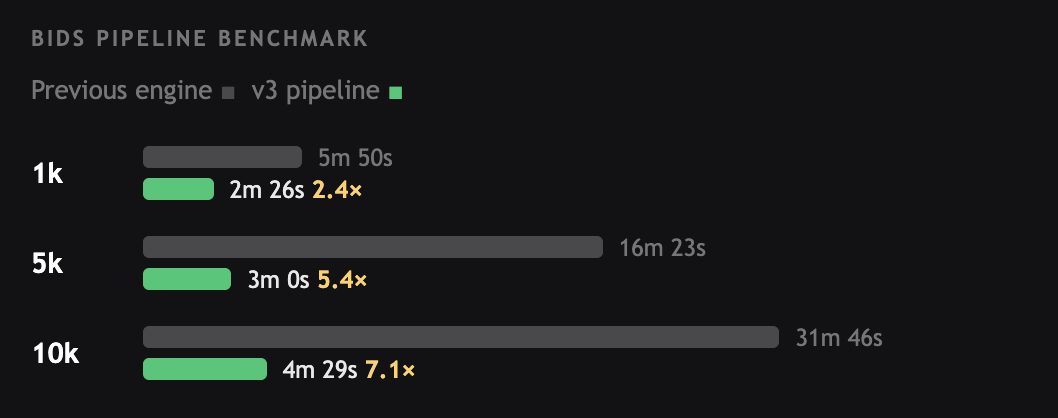
At 10,000 records, processing drops from 31 minutes 46 seconds to 4 minutes 29 seconds. That is 27 minutes saved per run. At 200,000+ records, the previous engine would take more than 45 minutes. The v3 pipeline does it in under 19 minutes.
For 3PLs pursuing enterprise accounts where prospects share years of shipment history rather than a sample file, this is the difference between running a competitive bid and telling a prospect to wait while you process their data.
BILLING
Every Charge Explained Before You Hit Approve
Billing has always followed the same path inside DiversiFi: set up a cycle, open a period, ingest carrier invoices, apply rules, review, and export. What changed this month is what you see when you get to the review step.
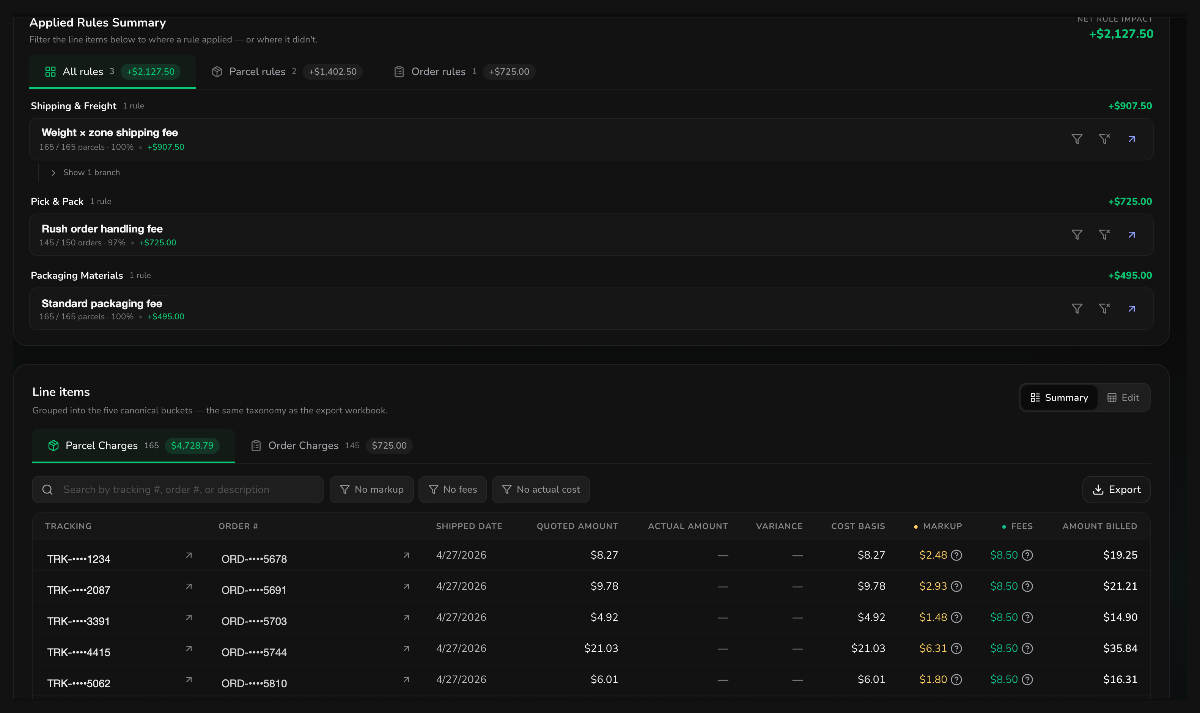
The bill detail page now opens with an Applied Rules Summary at the top. Before you scroll through a single line item, you can see exactly which rules ran, how many orders or parcels each rule touched, and the net dollar impact of each one. Filter between parcel rules and order rules, or see everything together.
Below that, line items are organized into the same four buckets your export workbook uses: Parcel Charges, Order Charges, Adjustments, and Other Fees. Every row shows the cost basis, markup, fees, and the final amount billed per shipment. Your team can answer why is this number here without opening a spreadsheet.
The rules builder has also been redesigned. It is now a full-page visual canvas where you define Event, Condition, and Application in sequence. Owlfred, DiversiFi's AI assistant, sits in the panel to help you build rules from plain English descriptions. You can also use Sheets for one-field rate tables and Pivots for weight-by-zone pricing. And you can preview any rule against a real billing period before it touches a live invoice.
Configure pricing once, see exactly what applied, and approve with confidence. That is the workflow this update was built around.
BIDBOOST + BILLING
Configure Carrier Costs the Way Your Contracts Actually Read
Enterprise carrier agreements are not a single DIM divisor and a single delivery area surcharge rate. They are layered structures with per-service thresholds, weight-banded accessorials, zone-specific rates, and service-level exceptions that vary across every carrier and every contract.
The new Advanced Cost Rate Configuration page lets you model the full contract in one place, per rate set. No more repeating the same values across multiple screens or approximating the parts that did not fit the old configuration model.
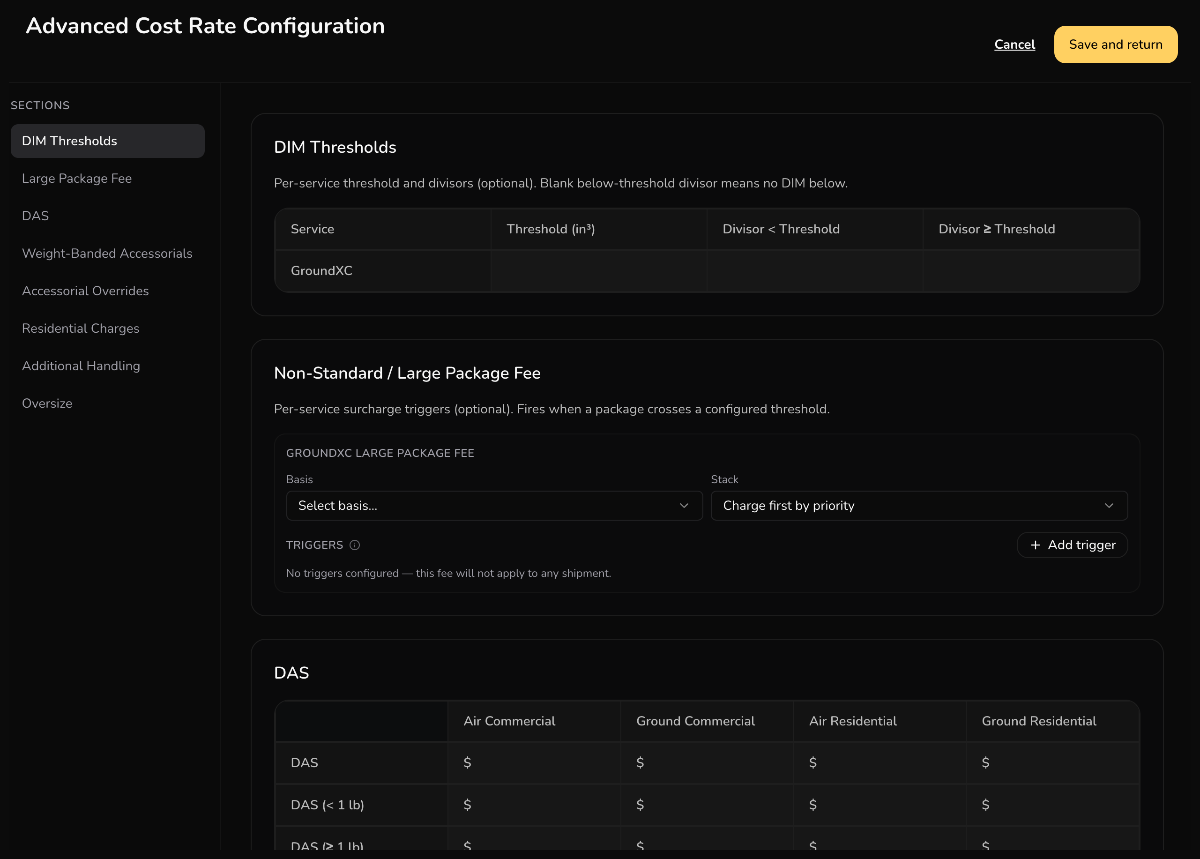
What is on the page:
- Per-service DIM thresholds and dual divisors. Set a cubic-inch threshold and separate divisors for below-threshold and at-or-above packages. A blank below-threshold divisor means no DIM applies under the threshold, matching how carriers like UPS Ground Saver actually behave.
- Non-standard and large-package fees. Configure cube-based and dimension-based triggers with configurable basis (per package or per shipment) and stacking rules.
- Weight-banded and zone-banded accessorials. DAS, EDAS, and RAS priced by weight band and zone, not a single flat amount across all shipments.
- Per-service accessorial overrides. Percent reduction, fixed reduction, or full waiver on specific services. For example, waiving DAS on an economy service while standard ground keeps full rates.
- Granular additional handling fees. Separate lines for Length plus Girth and Cube, so bid outputs show which trigger fired rather than a single rolled-up surcharge.
The result is a bid that reflects the contract you actually negotiated and an invoice that shows exactly which surcharge applied on every shipment. No approximations. No rolled-up numbers that leave your clients guessing.
BIDBOOST
Price With Context, Not Just a Percentage
Setting markup has always been part of BidBoost. What changed is the context around that decision.
The Review Pricing step has been redesigned around a simple idea: margin is a business decision, and business decisions need context. Estimated revenue and gross profit now display at the top of the screen and update in real time as you adjust rates. Each carrier and service gets a visual markup slider showing the min and max dollar range, so you can see where your cost sits relative to your proposed price as you move it.
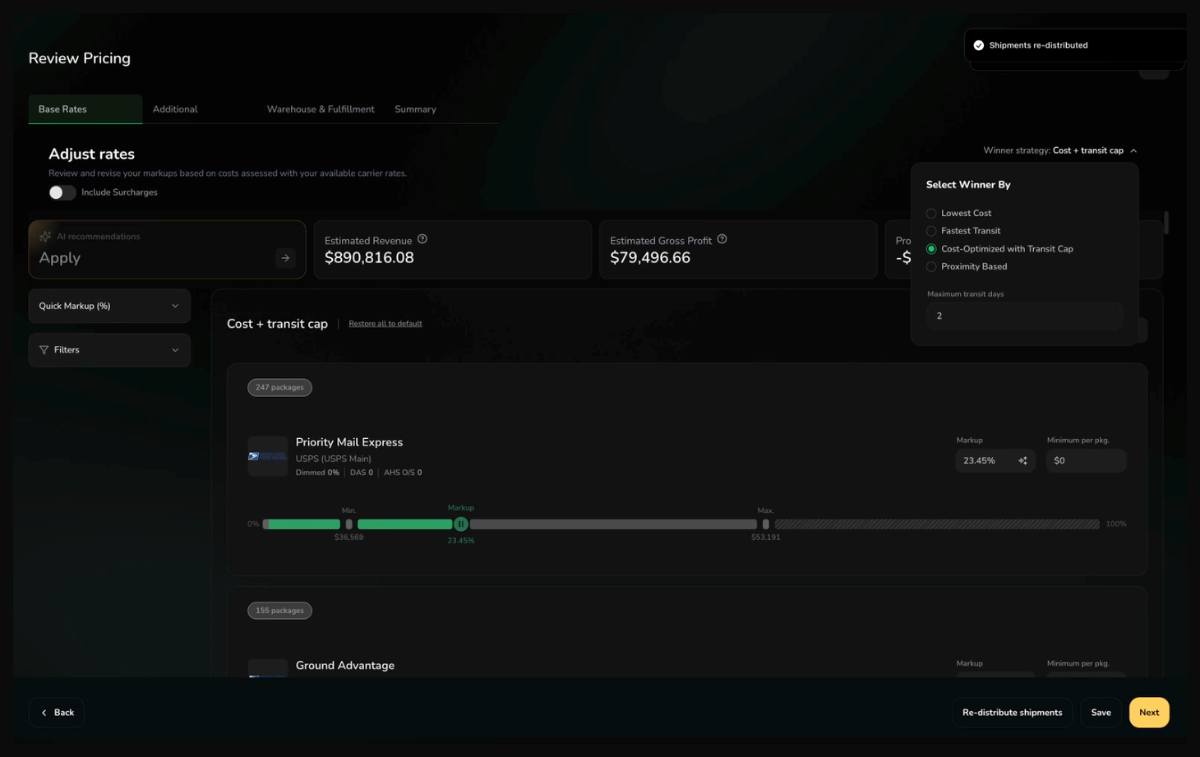
The new 'Select Winner By' control determines how the platform picks the winning rate for each shipment in your export:
- Lowest Cost. Cheapest eligible rate. This is the default.
- Fastest Transit. Shortest delivery time, with ties broken by cost.
- Cost-Optimized with Transit Cap. Lowest cost that still meets a transit time limit you set, such as a two-day cap.
- Proximity Based. For multi-warehouse bids, routes from the closest warehouse by zone.
Market rate savings and AI-suggested markup appear when DiversiFi's market data confidence is strong. When confidence is low on a specific lane or service, those markers stay hidden so your reps are not steered by unreliable benchmarks.
You set margin with full context and export a file that matches the strategy you sold.
Log In and Explore
Log in to your DiversiFi acount to see the v3 bid pipeline, the new billing detail page, the Advanced Cost Rate Configuration, and the redesigned pricing screen.
If you want a guided walkthrough of any of these updates or have questions about how to apply them to your specific carrier setup or billing workflow, reach out to your account team. We are happy to walk through it.
Not with DiversiFi yet? Book some time to see these features in action.
Frequently asked questions
How do bidding tools help 3PLs win more business?
What is 3PL bidding software?
How does AI dynamic billing work?
Continue learning



See AI for your 3PL In Action
Discover how our solutions can drive your success.